
Introducing the VORTEK Spaces Beta Program
Version 4.0.51059 · August 4th, 2026
We’re excited to announce that VORTEK Spaces’s latest update introduces the VORTEK Spaces Beta Program: a brand new way for designers, cabinet maker and woodworkers to test upcoming features and leave feedback that will directly impact future developments of the application. This program gives a voice to our most active customers and an opportunity to access upcoming features before their official release. If you enjoy discovering new tools early and want to help shape the future of VORTEK Spaces through feedback, this program is for you.
| Feature | What Changed |
|---|---|
| 📃New Beta Program | Join the new Beta Program to help shape the future of VORTEK Spaces. This new form is available from the support request button. |
| ⚙️ Access New Features Earlier | Early access to upcoming features, including PowerPoint Moodboard exports, 8K screenshots, smarter model replacement and category pre-downloads are coming with the Beta program. |
| 💡Provide Insigntful Feedback | Help shape VORTEK Spaces’s future by sharing your feedback with us. |
| 🐛 Bug Fixes and Improvements | Various stability, import and usability improvements throughout the application. |
New Beta Program
Starting with this update, you can now request access to the VORTEK Spaces Beta Program directly from within the application. While Beta licenses were previously available to a limited number of customers, this new program makes it easier for more users to participate.
You can submit a request from the Support Request window or from Settings > Advanced > Beta Features section. Once submitted, your request will be reviewed by our team. If approved, you’ll receive a confirmation email and can activate your Beta access by restarting the application.
Because Beta features are still under active development, they may contain bugs or incomplete functionality. Beta participants are encouraged to share feedback through upcoming surveys and feedback forms to help improve future updates. For any questions or inquiries, contact us directly.
As of right now, the best way to share feedback on beta features is through our Contact Support window. To access this window, simply look for the dialogue bubble shaped button on the top right corner of the application:
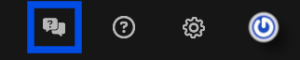
From there, select the “Subscribe to the Beta program” option to begin your request.
Currently Available Beta Features
As our Beta program evolves, you can look forward to new additions to our features pool with most new updates. Once a feature has been under Beta testing for long enough, it will be released to other non-beta users.
As of right now, here are the new exclusive features Beta testers can enjoy:
Automatic Collada Model Replacement
When importing .vok files from Cabinet Vision, VORTEK Spaces can now automatically replace base design 3D models such as hovens or sinks with optimized versions from our own model library. With this feature, you can set a template model that will always replace an original Cabinet Vision model upon opening or importing a new project. This will improve visual consistency and reduce the amount of manual cleanup required after each import.
To enable automatic model replacement:
- Go to Settings > Advanced tab and make sure to have Expert Mode and Enable beta features enabled.
- Import a compatible Cabinet Vision project file such as a
.vok. - Go to the Models tab and select any Cabinet Vision model from the project.
- Enable replacement mode with
ctrl+Hor by clicking the replacement mode button. - Replace your model with one from the VORTEK Spaces model library.
- Open its properties and look for the General section. From there, enable the “Replace Model automatically” option.
Any matching models configured for replacement will be automatically replaced during the import process and upon creating a new design.
A new management table is available under Settings > Import to review and manage automatically replaced materials and models.
PowerPoint Moodboard Export
Create customized and flexible moodboards by exporting VORTEK Spaces Moodboards directly to Microsoft PowerPoint. Instead of manually rebuilding a presentation, you can generate a PowerPoint (.pptx) file from your Moodboard and continue refining it with your branding, notes and additional content.
To use this feature, create or open a Moodboard by going in the Moodboard tab, then click the export “Export to PowerPoint” button. This is particularly useful when preparing design reviews, customer meetings or sales presentations.
8K and Square 4K Screenshot Exports
Beta users have access to additional export resolutions, including ultra-high-resolution 8K images and square 4K formats. These new options make it easier to create marketing assets, print-ready visuals and social media content without sacrificing image quality.
Simply chose those new resolution settings under the “Picture settings” section of the Camera Settings menu.
Pro-tip: the square 4K format is particularly useful for platforms that favor square imagery, such as Instagram!
Category Pre-Download
Large projects often require multiple assets from the same category. With the new category pre-download feature, you can download an entire material or model category in advance to reduce loading times during your workflow or live demos.
To download a category, right-click on any category in the Materials or Models library and click “Download“. Once the assets are stored locally, placing materials and models from that category becomes significantly faster and smoother.
Other Fixes & Improvements
- Materials can now be imported without selecting a surface beforehand.
- Improved rendering quality for viewpoint screenshots.
- The error message displayed when signing in with an incorrect password has been corrected.
- Other fixes: Fixed certain crashes when importing .IGES models, fixed an issue causing the model properties button to disappear after mass placement, and resolved several minor issues affecting project lists, YouTube uploads and other areas of the application.
Frequently Asked Questions
How do I join the Beta Program?
You can submit a Beta access request directly from the Support Request window or from Settings > Advanced > Beta Features. The support team will review your request before granting access to your account. Once access is granted, you must restart the application for it to be applied to your account.
Will I get Beta access immediately after requesting it?
No. Beta requests must be reviewed and approved before access becomes available.
Are Beta features stable?
Beta features are still under development. While they provide early access to upcoming functionality, they may contain bugs or undergo changes before becoming officially available.
Can I try VORTEK Spaces for free?
Yes. VORTEK Spaces offers a free trial — no credit card required. Start your free trial →
How do I update to VORTEK Spaces?
Download the latest version directly from your VORTEK Spaces application, or check for updates on the VORTEK Spaces Microsoft Store page.
Get the Latest Version
Start your free 14-day trial — no credit card required →
Already a subscriber? See all plans and pricing → · Watch video tutorials →